
Social Media Marketing: The Complete Guide for Beginners to Pros (2026)

New to social platforms and not sure where to begin? This complete 2026 guide walks you through social media marketing step by step — from strategy and content planning to Instagram growth, posting times and analytics. Everything is practical, beginner-friendly and free to apply, whether you are growing a small business or building a career in this field.
You will learn how to build a strategy, plan a month of content, grow on Instagram, pick the right posting times, track the right numbers and choose tools that save hours. Whether you want social media marketing for small business growth or you are starting fresh, every section gives you a clear system you can follow today.
What Is Social Media Marketing and Why Does It Matter?
Social media marketing means using platforms like Instagram, Facebook, LinkedIn and TikTok to attract attention, build trust and turn followers into customers. It combines content, community, analytics and sometimes paid ads into one repeatable process.
For social media marketing for small business, the appeal is obvious: you can reach local customers without a large budget. Good social media management for small business keeps your brand visible every week, while paid reach is optional. The rest of this guide shows you the exact steps, starting with how to create a social media strategy that actually fits your goals.
How to Start Social Media Marketing: The 5-Step Process
If you are wondering how to start social media marketing, follow these five steps in order. This is the simplest version of social media marketing for beginners that still works.
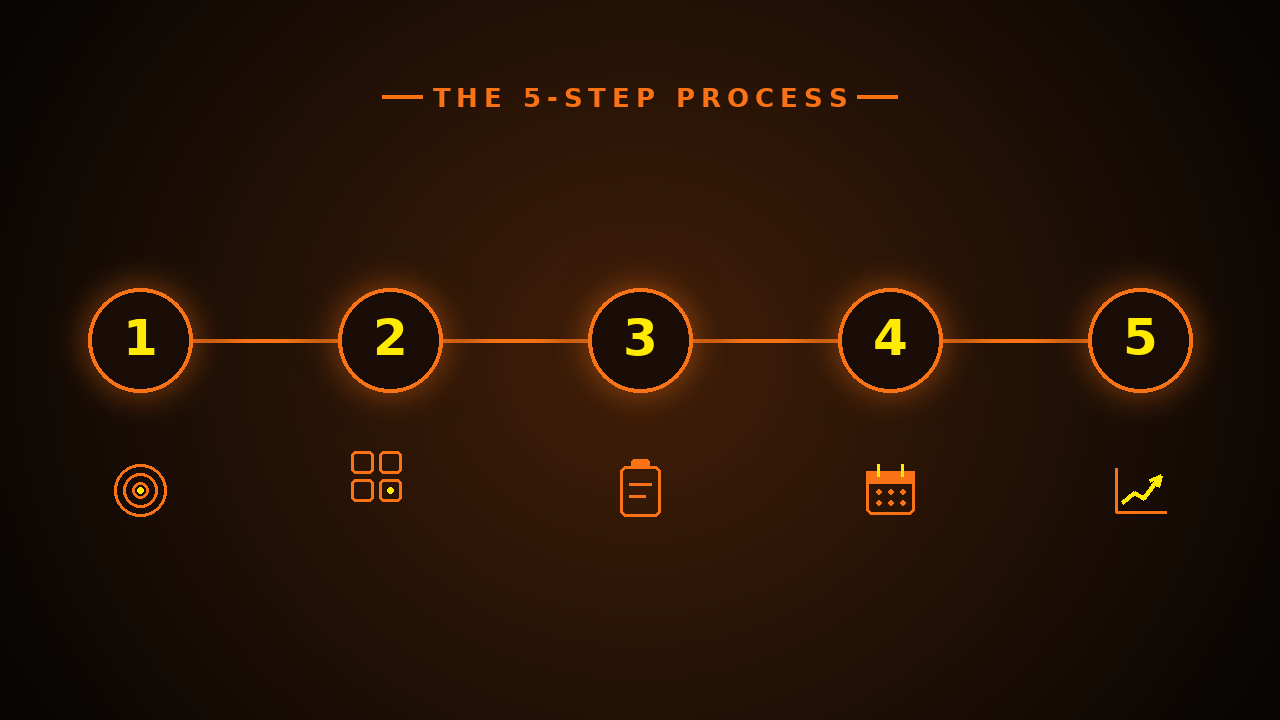
Step 1: Set clear goals
Every strong plan begins with a goal you can measure. Useful social media goals examples include growing followers by 20% in three months, sending 100 website visits per month, or generating 10 enquiries from DMs. Vague goals like "get more likes" give you nothing to improve.
Step 2: Know your audience and pick two platforms
Do not try to be everywhere. Choose two platforms where your customers already spend time. That focus is one of the best social media tips for small business owners who have limited time.
Step 3: Build your strategy
Here is how to create a social media strategy in one page: define your audience, your goals, your content pillars, your posting rhythm and the numbers you will review. A simple social media strategy template keeps this on one sheet so you can update it monthly.
Step 4: Create and schedule content
Turn your pillars into posts and schedule them in advance. Later in this guide we cover social media scheduling tools and a planning method that removes daily stress.
Step 5: Review and improve
Check results every month and double down on what works. A repeatable social media marketing checklist at the end of this post will keep you consistent.
Social Media Marketing Plan Template and Example
A plan turns ideas into action. Use this social media marketing plan template to organise your thinking, then compare it with the social media marketing plan example below.
| Plan Section | What to Write | Example |
|---|---|---|
| Goal | One measurable target | Get 30 leads from Instagram in 90 days |
| Audience | Who you want to reach | Local café owners aged 25–45 |
| Platforms | Maximum two to start | Instagram and Facebook |
| Content pillars | Three to four themes | Tips, behind the scenes, offers, reviews |
| Schedule | Frequency per platform | 4 posts per week, 3 stories per week |
| Review | When you check numbers | First Monday of every month |
Copy this social media marketing plan template into a spreadsheet and fill each row for your brand. Any social media strategy template works the same way: fewer sections, clearer actions.
Read the social media marketing plan example again and notice how every row connects to the goal. A plan that cannot be explained in one minute is usually too complicated to follow.
How to Create a Social Media Content Calendar
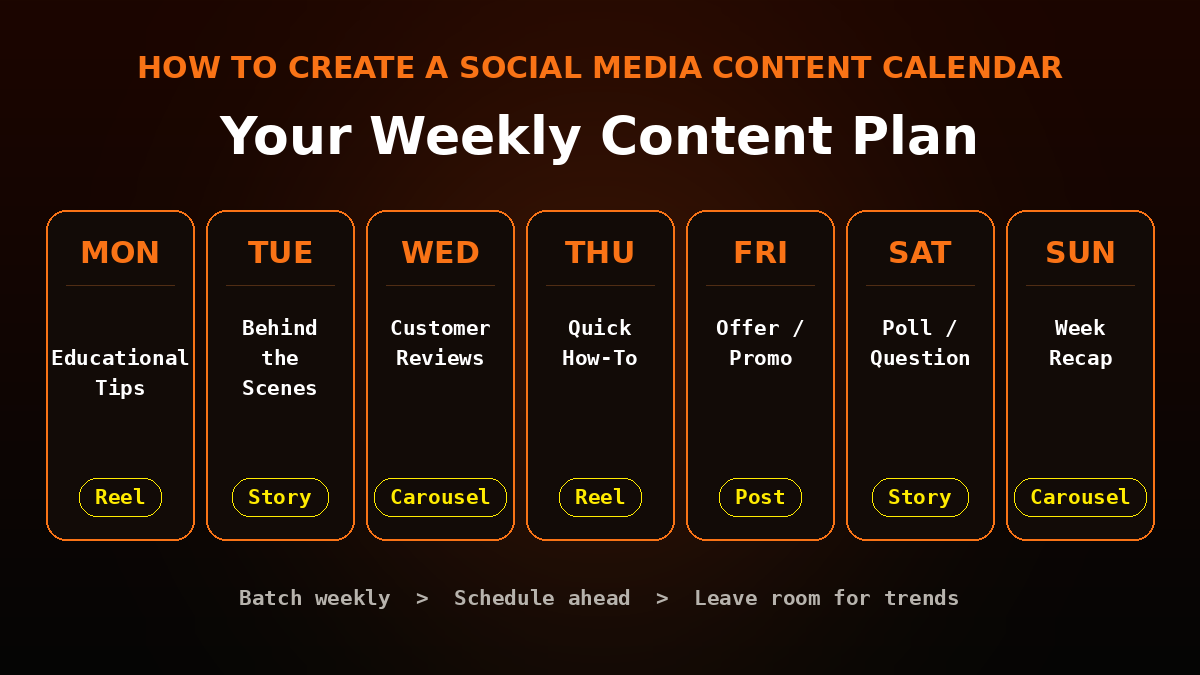
Consistency beats creativity, and a calendar is what makes consistency possible. Here is how to create a social media content calendar in four simple moves:
- List your content pillars and assign each one a day of the week.
- Set a realistic social media posting schedule you can keep even in a busy month.
- Batch your work. Write captions and design visuals for the whole week in one session.
- Leave space for trending topics and last-minute offers.
You can start with any social media content calendar template in Google Sheets: columns for date, platform, post type, caption and status. A good social media calendar template also includes a column for the call to action and a column for results. If Instagram is your main channel, build a separate content calendar for Instagram that mixes Reels, carousels and stories so the feed never feels repetitive.
Pick one social media calendar template and stay with it for three months before changing anything. Your social media posting schedule should show at a glance which pillar goes live on which day, and your content calendar for Instagram should mark which slots are Reels, carousels or stories. When everything is visible in one place, missed days become rare.
Social Media Marketing Post Ideas That Work
Running out of things to say is the number one reason small accounts go quiet. These social media post ideas solve that problem, and you can reuse them on every platform:
- Educational posts: short tips, how-tos and mini guides your audience can save.
- Behind the scenes: your workspace, your process, your team.
- Social proof: customer reviews, results and before-and-after stories.
- Questions and polls: easy engagement that also teaches you what people want.
- Offers and announcements: keep these to about one in five posts.
Mix them into a steady flow of social media content ideas built around your three or four pillars. Studying engaging social media posts examples from brands you admire helps too: notice the first line, the visual and the clear call to action.
For platform-specific inspiration, try Instagram caption ideas for business that open with a question or a bold claim, and Facebook post ideas for business such as local event updates, customer shout-outs and short video tips.
When you run short of social media content ideas, look at your most-saved posts and turn each one into a series. Collect engaging social media posts examples in a swipe file, and keep a list of Instagram caption ideas for business and Facebook post ideas for business you can adapt in minutes. Reusing a proven idea in a fresh format is smarter than starting from zero every week.
Instagram Marketing: Growth, Reels and Engagement
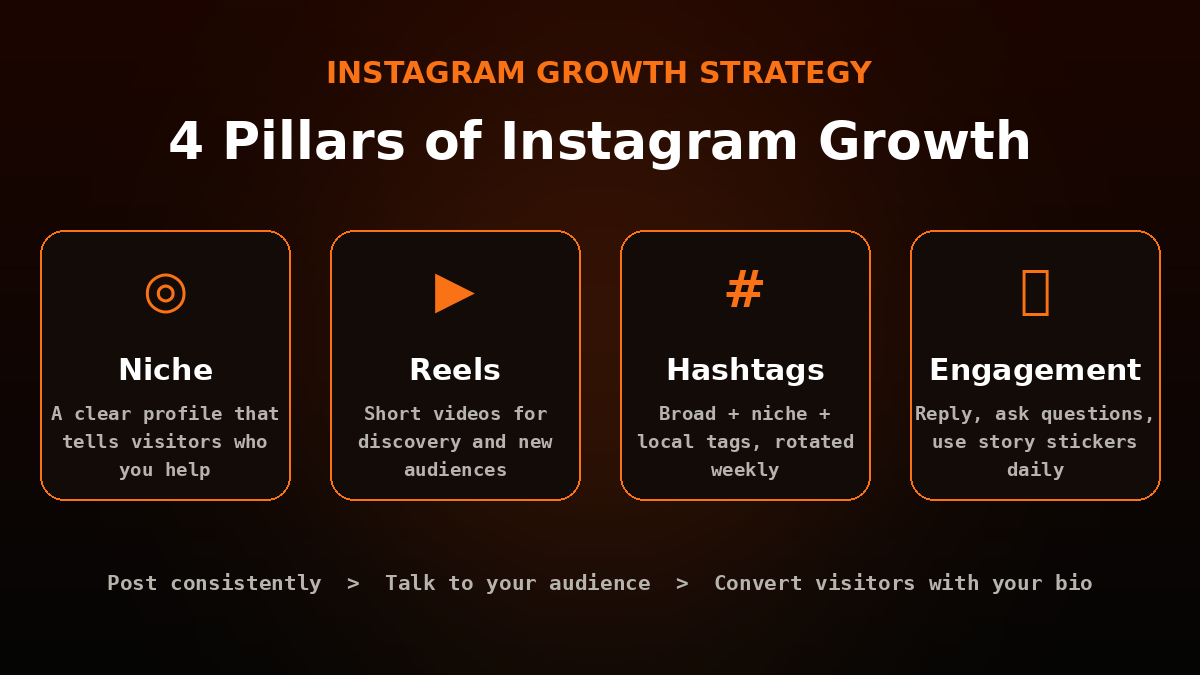
Instagram rewards accounts that post consistently and talk to their audience. A solid Instagram growth strategy has four parts: a clear niche, regular Reels, smart hashtags and daily conversation in comments and DMs.
Reels, hashtags and bio
Short video drives discovery, so plan Instagram Reels ideas for business around quick tips, product demos, myth-busting and day-in-the-life clips. Then add an Instagram hashtag strategy: use a mix of broad, niche and local tags, and rotate them instead of pasting the same set every time. Finally, polish your profile with Instagram bio ideas for business that state what you do, who you help and what action to take.
How to increase Instagram engagement
If you want to know how to increase Instagram engagement, reply to every comment within the first hour, ask direct questions in captions, use stickers in stories and post when your audience is online. Small daily actions beat occasional big pushes.
Your Instagram growth strategy works best when each part supports the others. Film Instagram Reels ideas for business in batches, follow your Instagram hashtag strategy to reach new people, and make sure your Instagram bio ideas for business turn new visitors into followers and enquiries.
Best Time to Post and How Often to Post
There is no universal perfect time, because every audience behaves differently. Use the table below as a starting point, then test and check your own analytics.
| Question | Starting Point | How to Confirm |
|---|---|---|
| Best time to post on Facebook | Weekday mornings and early evenings | Check Page Insights for active hours |
| Best time to post on LinkedIn | Weekday mornings during work hours | Compare impressions by posting time |
| Best time to post on TikTok | Evenings and weekends | Review the follower activity chart |
The best time to post on Facebook, the best time to post on LinkedIn and the best time to post on TikTok are all different for your audience than for the average, so treat these as hypotheses, not rules.
Quality matters more than volume. If you are asking how often to post on social media, a good beginner rhythm is three to five posts per week per platform. Your ideal social media posting frequency is the highest number you can keep for six months without lowering quality.
Many beginners ask how often to post on social media and expect a single number. The honest answer is to start small, watch your results for a month and increase only when quality stays high.
Social Media Marketing Analytics: Metrics, KPIs and Audits
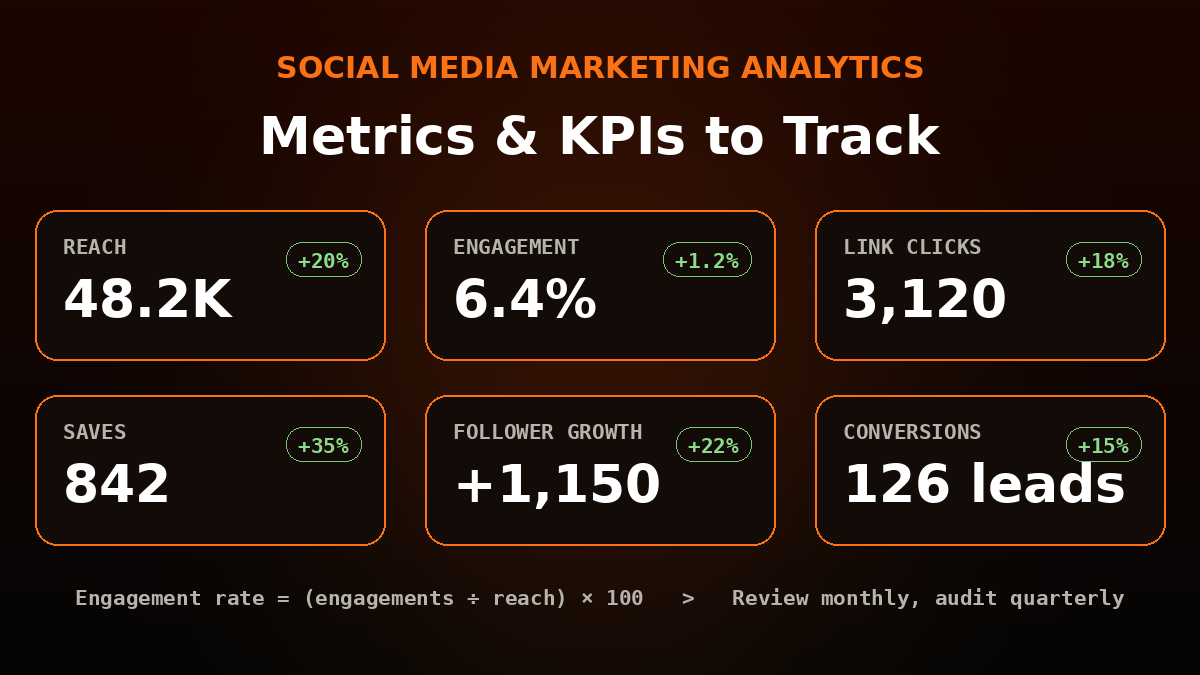
Numbers tell you what to repeat and what to drop. The most useful social media metrics to track are reach, engagement, clicks, saves, follower growth and conversions.
Turn those into social media KPIs tied to your goals. For example, if your goal is leads, your KPIs are link clicks and DMs. Use a social media engagement rate calculator (or a simple formula: total engagements divided by reach, times 100) to compare posts fairly.
Once a quarter, run a review using a social media audit template: list every account, check profile completeness, top posts, worst posts and audience fit. The best social media analytics tools for beginners are the free insights built into each platform, plus Google Analytics for website traffic.
Review your social media metrics to track in one simple dashboard, and use a social media engagement rate calculator each month to compare formats. A quarterly social media audit template will show where your profile or content has drifted. If you want more depth, the best social media analytics tools add benchmarking and competitor views on top of the free insights.
Free Social Media Management and Scheduling Tools
You do not need an expensive stack to start. Good social media scheduling tools let you plan a week in one sitting, and several free social media management tools cover scheduling, basic analytics and team approvals.
- Meta Business Suite: free scheduling for Facebook and Instagram.
- Buffer and Later (free plans): simple queues and a visual planner.
- Google Sheets: the easiest home for your calendar and reports.
- Canva for social media: templates, brand kits and quick Reels covers for non-designers.
For social media management for small business, start with one scheduler plus Canva, and add more only when a real bottleneck appears. Pair that setup with the social media tips for small business above and you can run an account in about five hours a week.
LinkedIn, B2B and Paid Social Media Marketing
Selling to other businesses works differently. B2B social media marketing focuses on trust, expertise and consistent visibility rather than viral reach. A strong LinkedIn marketing strategy combines an optimised profile, regular posts from the founder and genuine comments on other people's content.
If you need ideas, try LinkedIn content ideas such as lessons learned, client results, short case studies, opinions on industry news and simple how-to carousels.
When organic reach is not enough, paid campaigns can help. Facebook ads for beginners should start with a small daily budget, one clear offer and one audience. For social media advertising for small business, test two creatives, keep what wins and stop what does not.
A smart LinkedIn marketing strategy is the backbone of any B2B social media marketing effort: share one useful post per week, comment daily and send a few personal connection requests. Rotate LinkedIn content ideas between stories, data and advice, and test Facebook ads for beginners only after your organic posts show what resonates.
Social Media Marketing in Pakistan: Courses, Jobs and Freelancing
Demand for digital skills is growing fast, and social media marketing in Pakistan is now a practical career path for students and professionals alike. Local businesses, e-commerce stores and agencies all need people who can plan, create and report.
- Learn: a good social media marketing course in Pakistan should cover strategy, content, analytics and paid ads with real projects.
- Apply: search for social media marketing jobs in Pakistan on LinkedIn, Rozee.pk and agency career pages, and show a small portfolio.
- Understand the role: a typical social media manager job description includes planning content, scheduling posts, replying to the community and reporting results.
- Know the pay: a social media manager salary in Pakistan varies by city, experience and employer, so compare several listings before negotiating.
- Go independent: social media marketing freelancing lets you work with local and international clients once you have two or three case studies.
If you are comparing a social media marketing course in Pakistan, ask to see student work and a real syllabus. Reading a social media manager job description before you apply tells you which skills to practise, and checking several listings shows how a social media manager salary in Pakistan differs by employer and experience.
Common Social Media Marketing Mistakes to Avoid
- Posting without goals. Every post should support a measurable target.
- Being on too many platforms. Master two before adding a third.
- Selling in every post. Keep a healthy balance of value and offers.
- Ignoring comments and DMs. Community is half of the work.
- Never reviewing data. Without checking numbers, you repeat mistakes.
Social Media Marketing Checklist
Before you publish your next post, run through this social media marketing checklist:
- Set one goal from the social media goals examples above
- Write your strategy using a social media strategy template
- Fill your calendar with a social media content calendar template
- Pick a realistic social media posting frequency and stick to it
- Use proven social media post ideas built around your pillars
- Track your social media KPIs every month
- Audit your accounts once a quarter
Frequently Asked Questions About Social Media Marketing
How do I start social media marketing as a beginner?
Set one goal, choose two platforms, write a one-page strategy, schedule a week of content and review your numbers monthly. That is the simplest path to social media marketing for beginners.
How often should I post on social media?
Three to five posts per week per platform is a solid start. The right social media posting frequency is whatever you can sustain with good quality.
What is the best social media platform for small business?
It depends on your audience. Instagram and Facebook suit local and consumer brands, while LinkedIn suits B2B. Start with the two platforms where your customers already are.
Do I need paid ads for social media marketing?
No. Organic social media marketing for small business works well when you post consistently. Add social media advertising for small business later to speed up growth.
Can I earn money with social media marketing in Pakistan?
Yes. You can take social media marketing jobs in Pakistan, work with an agency or start social media marketing freelancing once you build a small portfolio.
Which free tools should I use?
Start with Meta Business Suite, Google Sheets and Canva for social media. Add other free social media management tools only when you need them.
Want a Social Media Plan Built for Your Brand?
Strategy, calendars and content take time. If you want a done-for-you social media marketing plan with clear goals, a content calendar and monthly reporting, MeetWithZaman can build and manage it for you.
Get In Touch Explore Our Services